So today I spent a non-trivial part of my morning monitoring the repair of a majorly blowed up database. I was the guy who found the problem, was the ticket owner for the fix, and was was front-ending all the user notifications and updates. So there was a good "business reason" as we like to say around here for why I was paying so much attention.
Plus, with the thing hosed, I couldn't do the work that I was actually trying to do.
Interestingly, there was a press conference going on at roughly the same time for Mars Phoenix which, despite having apparently discovered rocket fuel instead of life, was still worth paying attention to.
But what this meant was that I was fervently clicking "reload" (or refresh or whatever you prefer to call it) in at least four browser tabs: Unmannedspaceflight.com for Phoenix updates, the Remedy trouble ticket for updates from the DBA's, my email to try to get updates for various personal life threads, and the actual tool that I was trying to use to see if it could hit the databases OK.
Of course, anytime I hit "reload" and nothing had been changed I was quietly furious. Disappointed. Hurt. Resentful of the extreme negligence of the DBA's to not troubleshoot faster, of the people at NASA to not speak faster, of my friends to not write back immediately. Its an artifact of the modern world -- life at the speed of "reload."
People complain that we like our news in soundbite sized segments well suited to the 5:00 news. But I think that it is changing (or has changed) from that. We now expect our news to occur on demand. I get irritated when something happens at 2am -- so I can't watch it live. I get irritated when I wake up and find out that things happened several hours ago and there was all this time that I could have been posessing that knowledge, doing something interesting with it or just plain knowing it, but because those pesky Europeans live back there in Europe I missed the (pick one) Tour de France/Formula One race/ESA press conference/airshow.
But I'm not just craving immediate access to the latest information. I want that information to happen when, well, I'm in the mood for it. Hm, I could use a bit of juicy celebrity gossip...but wait, inconceivable, there's nothing! Hm, I wonder if John McCain has referred to The Ottoman Empire or Austria-Hungary or perhaps chosen to discuss Premier Bush's trip to The Orient...nope, no political gaffes! Things MUST happen! The MUST happen NOW!
And we don't just expect things to happen quickly or to have instant access to them ourselves. We seem to actually expect them to happen when we click on "reload."
I remember watching the invasion of Iraq (the first, fast moving, exciting part) as sort of an exercise in the rate at which CNN.com could update itself. Oh, the Marines are at such-and-such location trying to bridge a river...Reload...why haven't they crossed it yet? I KNOW better. I UNDERSTAND that the world is not actually a giant DVD recorded for my pleasure. I am not Adam Sandler in Click with my own magic web browser able to tell one group of people to stop producing news, just hold on guys, Mars is interesting right now. And then to tell another website to get moving, you've got audiences that demand satisfaction!
The reason I'm so convinced of this systemic change in our culture is that I believe it extends well beyond just news websites. In general, we have an expectation that everyone should be on call all the time -- and that we ourselves must be on call. When the phone rings, we answer it. When the text message arrives, we read it.
I'm not just talking about hipster kids or techno-tools who for social or professional reasons feel that they do have a need to be in touch 24x7. It is a pervasive situation (note that I do not say "problem" -- I'm not trying to pass judgement, just to comment) now. I see it in my friends, my family, and myself. We multitask at work and in our private time, and I often wonder (and here is where I stop saying situation and start saying problem) if this spreads our awareness too thin.
How hard is it, now-a-days, to get true quality time?
Showing posts with label computers. Show all posts
Showing posts with label computers. Show all posts
Tuesday, August 5, 2008


Tuesday, July 22, 2008
Red Sweater Love
This is a hat's off to the folks at Red Sweater software. This blog is created using their wonderful and lightweight little blogging application, MarsEdit.
 I'd been using their free trial since I created The Noodle Book and, last weekend, it expired. I was fine with that -- I love the free trial culture that is endemic among Mac developers. There is no way I can really get the feel of software without using it, and I've definitely bought programs because I could try them when, without a demo, I'd have done nothing and soldiered on with what I had.
Anyway, I unflinchingly spent the thirty bucks and picked up a license. What followed amazed me. In the order form there was a little space for comments. I put in a couple of notes. I normally wouldn't bother (who reads these things anyway?), but did have one suggestion. I commented that it'd be nice if Picasa was more effectively supported by the media manager built into MarsEdit. I use blogspot and have hesitated to get too hooked into too many services (i.e. Flickr) for too many different reasons just for fear of loosing track of everything.
I got the confirmation mail, registered the application, and resumed cheerfully nag-free blogging. Then I got another mail from Red Sweater. I assumed it was another irritating double-mailing (I'm sure you get those too -- where you sometimes get two receipts from an online order or a charge receipt and then a product receipt and then an unlock key...). But instead of trashing it, I read it.
So, not five or ten minutes after I placed my order, the developer of the application got back to me with an update on the status of my request. Try that with Microsoft or Adobe or Apple...
Now I'm going to thank Daniel by telling you why I like MarsEdit and why, while I do admit it is imperfect, I think you may want to consider using it as well.
First off, it is a classic "just enough" application. There is not a lot of fat here. A place to compose your blog, do some basic management of entries, and upload some supporting images and files. There is no WYSIWYG capability -- there is a rather nice ability to insert HTML tags into the text, but they show up as, well, HTML tags rather than as the promised formatting. I'm fine with that -- actually I rather like it -- since I'm pretty familiar with HTML and tend like the ability to easily go in and edit the code myself.
Images can be uploaded with some basic formatting -- but again they can be edited inline if necessary. This is the area of my one mild unhappiness -- Mars Edit only works with Flickr galleries. My stuff is uploading to Picasa through Blogspot, of course, but there isn't a way that I can go "back" and review or reuse the images in that gallery from within MarsEdit. If I was hardcore making it happen with Flickr for my photography (which is pretty non-existant) then I could actually manage all the images there with a great deal more flexibility. But again, MarsEdit is doing fine for what I need. I can put pictures into my postings and am happy.
The main reason that I use an offline blog editor -- for you might say "Blogspot offers great editing capabilities!" as indeed they do -- is that I often blog during my commute. On the train, on the bus, at cafés during lunch, at all kinds of crazy locations. Not all of them provide reliable Internet connectivity. And without reliable Internet, the online composer becomes a high-risk environment if it is even possible to get started at all. As a footnote, I'm actually writing this entry in the Seattle Bus Tunnel, an area devoid of any valid connectivity.
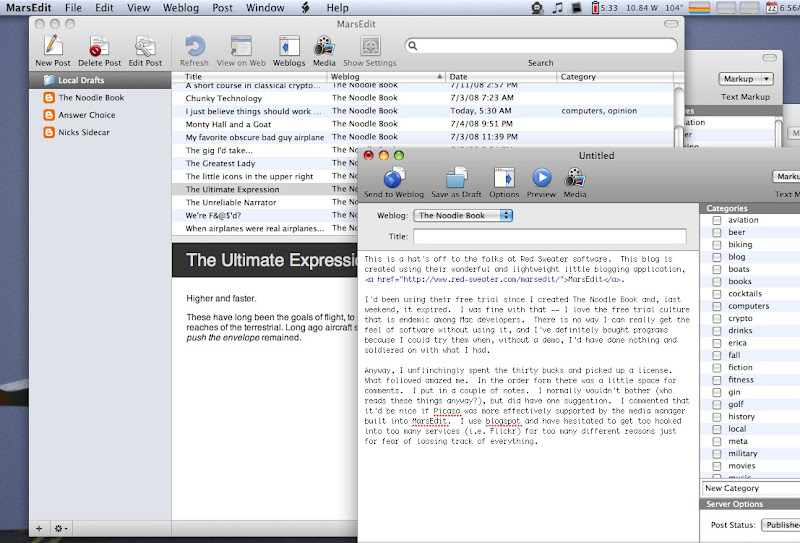 I can compose using the online tool and the suck the post down to MarsEdit as well, though when a brainstorm hits me at work I usually write it in an email and send it to myself for copy-and-paste treatment. I also have a fat roll of half-started postings waiting for the brainstorm of completion to come along. I can grab one of these and flesh it out for a few minutes and then save it for later review (yes, I know that Blogspot supplies this ability as well, but I find MarsEdit does so much more cleanly). It also nicely handles my two (and eventually, I hope, three) blogs.
For formatting changes and re-arrangements of the various components of The Noodle Book, I use Blogspot's tool set, of course. That's fine -- these are periodic tasks involving dramatic changes in format, new bits of content, and the like.
Anyhow, this MarsEdit is a great example of that sort of cottage development that is part of why I like my MacBook so much. And as for responsiveness -- I've never sen better! So check it out and show these guys some support if you like what you see.
And now, thanks to King County Metro, I'm going to post a blog entry while riding the bus.
 I'd been using their free trial since I created The Noodle Book and, last weekend, it expired. I was fine with that -- I love the free trial culture that is endemic among Mac developers. There is no way I can really get the feel of software without using it, and I've definitely bought programs because I could try them when, without a demo, I'd have done nothing and soldiered on with what I had.
Anyway, I unflinchingly spent the thirty bucks and picked up a license. What followed amazed me. In the order form there was a little space for comments. I put in a couple of notes. I normally wouldn't bother (who reads these things anyway?), but did have one suggestion. I commented that it'd be nice if Picasa was more effectively supported by the media manager built into MarsEdit. I use blogspot and have hesitated to get too hooked into too many services (i.e. Flickr) for too many different reasons just for fear of loosing track of everything.
I got the confirmation mail, registered the application, and resumed cheerfully nag-free blogging. Then I got another mail from Red Sweater. I assumed it was another irritating double-mailing (I'm sure you get those too -- where you sometimes get two receipts from an online order or a charge receipt and then a product receipt and then an unlock key...). But instead of trashing it, I read it.
Hi Nick - glad you are enjoying the app! I want to open up the media browser to support other image-hosting sites, and when I do, Picasa will be high on the list!
Daniel
So, not five or ten minutes after I placed my order, the developer of the application got back to me with an update on the status of my request. Try that with Microsoft or Adobe or Apple...
Now I'm going to thank Daniel by telling you why I like MarsEdit and why, while I do admit it is imperfect, I think you may want to consider using it as well.
First off, it is a classic "just enough" application. There is not a lot of fat here. A place to compose your blog, do some basic management of entries, and upload some supporting images and files. There is no WYSIWYG capability -- there is a rather nice ability to insert HTML tags into the text, but they show up as, well, HTML tags rather than as the promised formatting. I'm fine with that -- actually I rather like it -- since I'm pretty familiar with HTML and tend like the ability to easily go in and edit the code myself.
Images can be uploaded with some basic formatting -- but again they can be edited inline if necessary. This is the area of my one mild unhappiness -- Mars Edit only works with Flickr galleries. My stuff is uploading to Picasa through Blogspot, of course, but there isn't a way that I can go "back" and review or reuse the images in that gallery from within MarsEdit. If I was hardcore making it happen with Flickr for my photography (which is pretty non-existant) then I could actually manage all the images there with a great deal more flexibility. But again, MarsEdit is doing fine for what I need. I can put pictures into my postings and am happy.
The main reason that I use an offline blog editor -- for you might say "Blogspot offers great editing capabilities!" as indeed they do -- is that I often blog during my commute. On the train, on the bus, at cafés during lunch, at all kinds of crazy locations. Not all of them provide reliable Internet connectivity. And without reliable Internet, the online composer becomes a high-risk environment if it is even possible to get started at all. As a footnote, I'm actually writing this entry in the Seattle Bus Tunnel, an area devoid of any valid connectivity.
For formatting changes and re-arrangements of the various components of The Noodle Book, I use Blogspot's tool set, of course. That's fine -- these are periodic tasks involving dramatic changes in format, new bits of content, and the like.
Anyhow, this MarsEdit is a great example of that sort of cottage development that is part of why I like my MacBook so much. And as for responsiveness -- I've never sen better! So check it out and show these guys some support if you like what you see.
And now, thanks to King County Metro, I'm going to post a blog entry while riding the bus.
I just believe things should work properly...
This is not a blog post about the Dyson vacuum cleaner. Partially, this relates to a congenital inability to spell the word vacuum that will always haunt me. Partially it is because as fine as that machine is, and it is a fantastic vacuum (I'm practicing now and making myself type vacuum a lot), I can't quite summon up the blogging passion.
But Microsoft Windows can. See I'm a long-time Mac user. Been there since the early days of the 128K "skinny Mack" and the 512K "fat Mac." Remember those times, when memory was measured in some obscure and miniscule unit called the Kilobyte? Modems were slow, screens small, and disks floppy...
Anyway, I stray. The point is, I find that my little MacBook works properly. Provided I don't do something jackass stupid like assigning three applications to respond to the same hotkey combination or such, it does what it is supposed to. I can slow it down by running a dozen different applications including a few good memory and CPU hogs at once. I can crash it, occasionally, by throwing excessively weird combinations of network access at iTunes and then killing the network.
But overall, things work properly. To misrepresent Yokihiro Matsumoto (creator of Ruby), it embodies the Principle of Least Surprise. The Mac (I'm not actually talking about Ruby here) does more or less what you expect. And it, for the most part, does things in an order of convenience that relates to the order in which you will need to do them. Obviously needed features are obvious to access. Obscure but occasionally cool features are obscured. And there are just a few cool "power tricks" out there, hidden away but documented if you look for them, that you can really get the system rocking if you want.
And then there's my XP machine at work. Its a nice little Lenovo laptop, not too far off my MacBook in terms of spec's. But oh, oh, the trials. I'm not even talking about Windows XP SP2 itself -- which should have a certain B-52 like robustness (but as we've rather sadly learned, even they can crash). I'm talking about the applications.
Ever have the dreaded phantom paragraph problem in Word? Where there is some paragraph marker that, if you delete it, suddenly causes your entire document to reformat into some obscure font? Hey, when I chose select all and then changed my font, I really did mean select all! Or sometimes there is the close cousin, the paragraph of steel -- you simply can't get the space to go away, no matter what you do. Select and cut, select and delete, backspace over it, select it and type other characters and then delete them. In the end the solution sometimes ends up being simply shrinking the font size way down -- though sometimes that doesn't stick until you type a few characters and then set the type color the same as the background color because if you erase those letters the space returns to its original size.
Half the time, I end up just copying and pasting the text into a new document. That's a robust solution! Its a good thing bytes come cheap...
And then there is a moment to truly test your manhood (or womanhood): creating a table in Word. Half the time, once established, it refuses to let you grow (or shrink it). And woe betide the person who doesn't realize that what they are typing in isn't a table, but an embedded Excel document.
Its rather a joke at the office because I keep threatening to throw my Lenovo out the window. And one day I will. And it will probably be Outlook that does it. I manage a couple of mailboxes and some shared calendars. Fine enough -- but the degree of gothic square dancing required to create make this work is infuriating. And I suppose that some people like the whole concept of Outlook -- that the mail is served from a central location. Nice if you are hoteling and don't have a laptop or your computer gets stolen or you get fired. But I'm left with a puny storage allocation and an inability to read mail whenever the network is feeling funny. Or the outlook server. And then I get to quit outlook and restart it.
Yesterday, for three hours, I couldn't send mail. Oh, it appeared to be sent, it just never arrived. Why? I'd filled up my disk quota. I had to poke around until I finally realized this -- no thanks for the warning, guys. Half of what I sent later showed up, the other half I had to re-send. And occasionally Outlook apparently gets so frustrated with itself that it crashes the entire computer and will only reconnect to the server if I do a full restart.
For various reasons we run Internet Explorer at work -- it is the "officially supported" browser and if I try to use Firefox it keeps throwing me dialog boxes that force a sign-in because I might be some intruder, I guess. Anyway, I also find that IE7 is returning to the days when we used to call it "Internet Exploder" just for fun. Ironically, one of the sites that causes it (and any related instances) to immediately crash is the Apple website! But also a few other totally innocuous ones. Don't ask me why -- it just vanishes.
My old XP box at my old job would periodically span an infinite number of browser windows, too. They would just start appearing -- I gut up over 50 of them one time. The system would then hang and they would all vanish suddenly. No one ever could figure out why. They just stood around and kinda' laughed. This was at an IT school. These people were instructors. You'd think they'd have known (or cared) what was going on. The behavior may be as much as symptom of that place's culture, but the sort of fixed-focus backup-and-re-image approach to troubleshooting is something I see too often among windows hacks. It'd be like bringing your car in for busted wiper blades and having the mechanics install a new engine and transmission and tell you to clean out your glove box.
But the overall situation is just that dreaded designed-by-committee feeling. Microsoft, I'm convinced, can't say no to a focus group's feature request. Oh, six people out there might need a certain feature...so we'll try to build it in. This isn't just a bloatware issue regarding memory and performance. It is about UI. As you pile on more and more things, you need more and more layers of menu, dialog box, tab, and drop-down to access them. That or you run the risk of creating excessively complex sets of options at any given level. And both XP and Office 2003 suffer from all of these.
I'll give Microsoft one thing -- Office 2007 is a lot better. It trades away the equally pain-in-the-ass to access everything approach of '03 for a highly customizable interface. I loved it for the brief period I was using it -- loved at least as compared to '03. That was once I got over the learning curve of setting things up the way I wanted. Which means that I suspect it will be judged a complete failure. Because most of the other people I know hated it. That's because the original release forced them into habits that they'd gotten so used to that the novelty (and pain) of an innovative approach was unfathomable. Understandable, too, because in many ways the elaborate routines and workarounds demanded by the software are hard to unlearn!
People often say that the Mac approach requires the user to learn to do things in the Mac way. This is, in some ways, absolutely correct. Windows, with its 86 ways to do anything, is great if you need to use way number 71 or 83 or even 29. But the Mac, with only a few ways to do the same thing, makes way number 1 or 3 or 8 so much easier... It is a false advantage, then, to say that Windows offers more options to get things done -- because that implies greater flexibility or convenience.
Well, I'm feeling better for this. There's nothing like forcing other people to read about your woe, I find, to ease the sole. Thanks for listening!
But Microsoft Windows can. See I'm a long-time Mac user. Been there since the early days of the 128K "skinny Mack" and the 512K "fat Mac." Remember those times, when memory was measured in some obscure and miniscule unit called the Kilobyte? Modems were slow, screens small, and disks floppy...
Anyway, I stray. The point is, I find that my little MacBook works properly. Provided I don't do something jackass stupid like assigning three applications to respond to the same hotkey combination or such, it does what it is supposed to. I can slow it down by running a dozen different applications including a few good memory and CPU hogs at once. I can crash it, occasionally, by throwing excessively weird combinations of network access at iTunes and then killing the network.
But overall, things work properly. To misrepresent Yokihiro Matsumoto (creator of Ruby), it embodies the Principle of Least Surprise. The Mac (I'm not actually talking about Ruby here) does more or less what you expect. And it, for the most part, does things in an order of convenience that relates to the order in which you will need to do them. Obviously needed features are obvious to access. Obscure but occasionally cool features are obscured. And there are just a few cool "power tricks" out there, hidden away but documented if you look for them, that you can really get the system rocking if you want.
And then there's my XP machine at work. Its a nice little Lenovo laptop, not too far off my MacBook in terms of spec's. But oh, oh, the trials. I'm not even talking about Windows XP SP2 itself -- which should have a certain B-52 like robustness (but as we've rather sadly learned, even they can crash). I'm talking about the applications.
Ever have the dreaded phantom paragraph problem in Word? Where there is some paragraph marker that, if you delete it, suddenly causes your entire document to reformat into some obscure font? Hey, when I chose select all and then changed my font, I really did mean select all! Or sometimes there is the close cousin, the paragraph of steel -- you simply can't get the space to go away, no matter what you do. Select and cut, select and delete, backspace over it, select it and type other characters and then delete them. In the end the solution sometimes ends up being simply shrinking the font size way down -- though sometimes that doesn't stick until you type a few characters and then set the type color the same as the background color because if you erase those letters the space returns to its original size.
Half the time, I end up just copying and pasting the text into a new document. That's a robust solution! Its a good thing bytes come cheap...
And then there is a moment to truly test your manhood (or womanhood): creating a table in Word. Half the time, once established, it refuses to let you grow (or shrink it). And woe betide the person who doesn't realize that what they are typing in isn't a table, but an embedded Excel document.
Its rather a joke at the office because I keep threatening to throw my Lenovo out the window. And one day I will. And it will probably be Outlook that does it. I manage a couple of mailboxes and some shared calendars. Fine enough -- but the degree of gothic square dancing required to create make this work is infuriating. And I suppose that some people like the whole concept of Outlook -- that the mail is served from a central location. Nice if you are hoteling and don't have a laptop or your computer gets stolen or you get fired. But I'm left with a puny storage allocation and an inability to read mail whenever the network is feeling funny. Or the outlook server. And then I get to quit outlook and restart it.
Yesterday, for three hours, I couldn't send mail. Oh, it appeared to be sent, it just never arrived. Why? I'd filled up my disk quota. I had to poke around until I finally realized this -- no thanks for the warning, guys. Half of what I sent later showed up, the other half I had to re-send. And occasionally Outlook apparently gets so frustrated with itself that it crashes the entire computer and will only reconnect to the server if I do a full restart.
For various reasons we run Internet Explorer at work -- it is the "officially supported" browser and if I try to use Firefox it keeps throwing me dialog boxes that force a sign-in because I might be some intruder, I guess. Anyway, I also find that IE7 is returning to the days when we used to call it "Internet Exploder" just for fun. Ironically, one of the sites that causes it (and any related instances) to immediately crash is the Apple website! But also a few other totally innocuous ones. Don't ask me why -- it just vanishes.
My old XP box at my old job would periodically span an infinite number of browser windows, too. They would just start appearing -- I gut up over 50 of them one time. The system would then hang and they would all vanish suddenly. No one ever could figure out why. They just stood around and kinda' laughed. This was at an IT school. These people were instructors. You'd think they'd have known (or cared) what was going on. The behavior may be as much as symptom of that place's culture, but the sort of fixed-focus backup-and-re-image approach to troubleshooting is something I see too often among windows hacks. It'd be like bringing your car in for busted wiper blades and having the mechanics install a new engine and transmission and tell you to clean out your glove box.
But the overall situation is just that dreaded designed-by-committee feeling. Microsoft, I'm convinced, can't say no to a focus group's feature request. Oh, six people out there might need a certain feature...so we'll try to build it in. This isn't just a bloatware issue regarding memory and performance. It is about UI. As you pile on more and more things, you need more and more layers of menu, dialog box, tab, and drop-down to access them. That or you run the risk of creating excessively complex sets of options at any given level. And both XP and Office 2003 suffer from all of these.
I'll give Microsoft one thing -- Office 2007 is a lot better. It trades away the equally pain-in-the-ass to access everything approach of '03 for a highly customizable interface. I loved it for the brief period I was using it -- loved at least as compared to '03. That was once I got over the learning curve of setting things up the way I wanted. Which means that I suspect it will be judged a complete failure. Because most of the other people I know hated it. That's because the original release forced them into habits that they'd gotten so used to that the novelty (and pain) of an innovative approach was unfathomable. Understandable, too, because in many ways the elaborate routines and workarounds demanded by the software are hard to unlearn!
People often say that the Mac approach requires the user to learn to do things in the Mac way. This is, in some ways, absolutely correct. Windows, with its 86 ways to do anything, is great if you need to use way number 71 or 83 or even 29. But the Mac, with only a few ways to do the same thing, makes way number 1 or 3 or 8 so much easier... It is a false advantage, then, to say that Windows offers more options to get things done -- because that implies greater flexibility or convenience.
Well, I'm feeling better for this. There's nothing like forcing other people to read about your woe, I find, to ease the sole. Thanks for listening!
Subscribe to:
Posts (Atom)